
WordPress plugin Web Alchemy
WA Premium Motion
13 effects for WordPress: 7 entrance effects, 3 hover effects and 3 click effects. Speed settings, CSS classes for blocks and reduced-motion support.
Before purchasing
Compatibility and Version 1.2.0 Limitations
Minimum requirements: WordPress 6.5 and PHP 7.4. Version 1.2.0 was tested in an isolated WordPress 7.1 environment on PHP 8.4.1 with WooCommerce 11.1.0. This does not guarantee compatibility with every theme or builder: test your combination on a copy of the site before updating.
What's Inside
Choose Motion for a Specific Block
WA Premium Motion 1.2.0 adds 13 ready-made effects to WordPress blocks: 7 entrance options, 3 hover effects, and 3 press responses. For example, text can fade in smoothly, a product card can zoom in, and a button can briefly shrink. You choose the blocks and motion intensity without changing their content.
Try the Animations in the Demo. These are isolated examples using the same JavaScript and CSS included in the commercial version. No real orders or admin access.
Effects available in version 1.2.0
- Reveal on scroll: rise, fade in, slide from the left or right, zoom in, spring entrance, and rotation.
- On mouse hover: lifting, scaling up, or tilting a card.
- Press: a change in opacity, a press-in effect, or a brief button bounce. Links and button actions continue to work.
Connecting to blocks
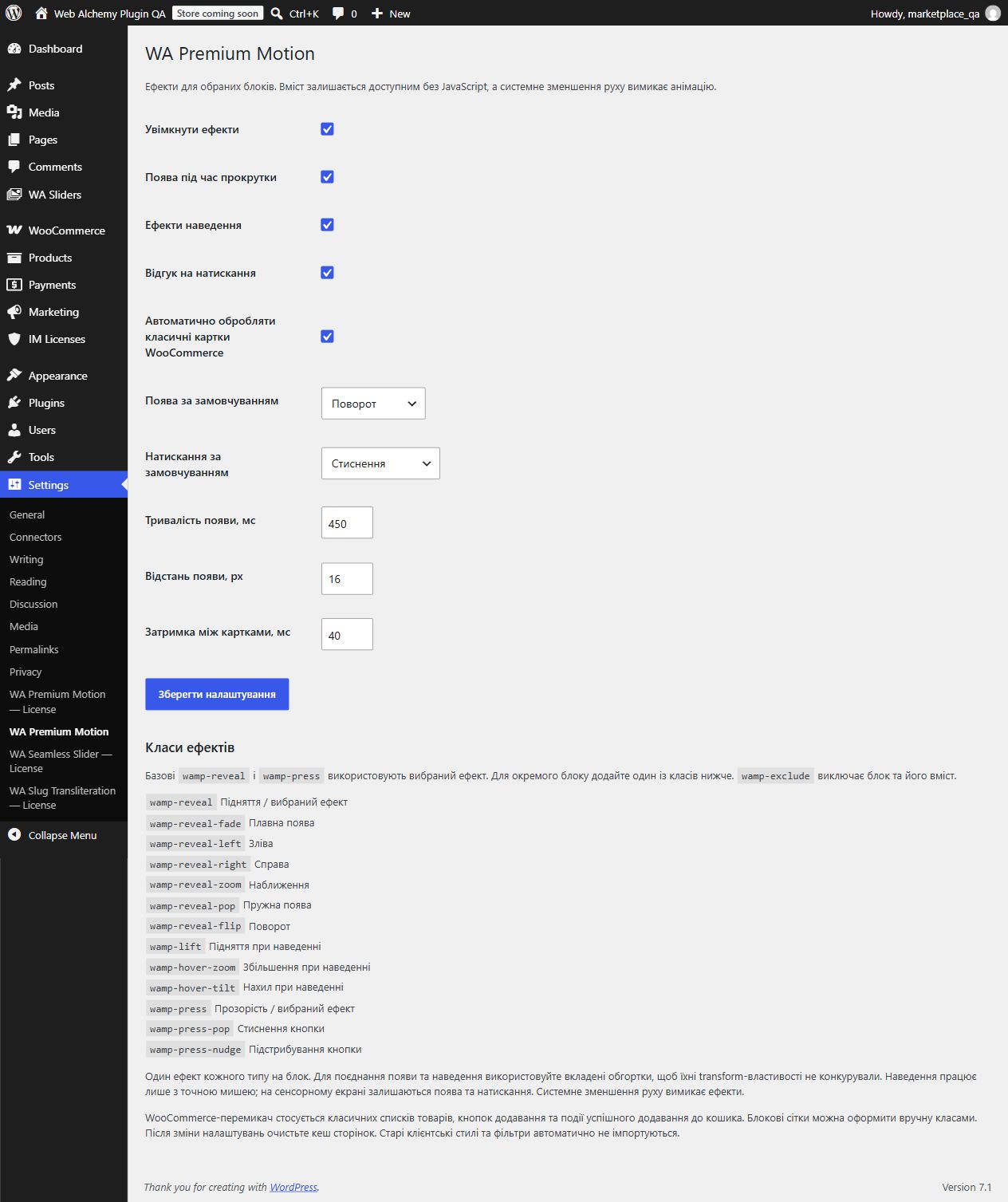
Add the effect class to the target block’s additional CSS classes field. For example, wamp-reveal-fade for a smooth entrance, wamp-reveal-zoom for zooming in, wamp-hover-tilt for tilting or wamp-press-pop for a button press effect. The full list is available in the settings and guide.
Base classes wamp-reveal and wamp-press use the effects selected in the admin panel. The class wamp-exclude excludes the container and its descendants. To combine entrance and hover effects, use nested wrappers: this prevents conflicts between their transform properties.
Configuration without editing code
- A master switch and independent controls for reveal, hover, and press effects.
- Selection of the default entrance and click effects.
- Entrance duration from 100 to 1000 ms, distance from 0 to 40 px, and delay between elements from 0 to 100 ms.
- Detection of new blocks after AJAX without reloading the page.
- An optional mode for classic WooCommerce product pages.
Content remains accessible
Text and buttons remain visible without JavaScript. The system's reduced-motion setting disables effects, including when the setting changes while the page is open. Keyboard focus stops the container animation; hiding the tab or printing cancels current motion. Hover effects work with a precise mouse pointer, while entrance and press effects remain available on touchscreens.
For WooCommerce
An optional mode handles classic product lists and the standard successful add-to-cart event. After a successful action, the card provides brief feedback. For block grids and custom templates, apply the classes manually. The plugin does not send cart requests or modify orders. WooCommerce is not included in the archive and is not required for regular blocks.
What the buyer receives
An installable plugin ZIP, an individual key in a private outer archive, a user guide, license activation and transfer instructions, and a technical description. One purchase provides one active installation, transferable after deactivation. The source code is licensed under GPL-2.0-or-later.
Installation and updates
- Make a backup. Upload the inner ZIP through Plugins → Add Plugin and activate it.
- Enter your individual key on the License page under Settings.
- Enable the effects you need and add classes to the blocks.
- Clear the page cache and check the result on a computer and phone.
Version 1.1.0 settings are preserved. If no new effects are selected, the base classes continue to use upward movement and opacity changes. The update is installed manually.
Compatibility and Version 1.2.0 Limitations
Minimum requirements: WordPress 6.5 and PHP 7.4. Version 1.2.0 was tested in an isolated WordPress 7.1 environment on PHP 8.4.1 with WooCommerce 11.1.0. This does not guarantee compatibility with every theme or builder: test your combination on a copy of the site before updating.
A modern browser with Web Animations and individual CSS transform properties is required. This is a set of ready-made effects, not a free-form animation editor: there is no timeline, parallax, CSS selector editor or automatic updating. The theme's own animations may require a separate wrapper. Client-specific styles from the original project and its filter state are not imported.
Settings take effect on a new page load. After changing them or deactivating the license, clear the HTML/CDN cache. Pages already open use the resources they have loaded. Without a verified license, newly loaded pages retain their content and do not load the effects.
Actual interface 1.2.0
Product features
- 7 entrance effects: rise, fade, from left, from right, zoom, bounce, rotation
- 3 hover effects: lift, scale, tilt
- 3 click feedback effects: opacity, press-in, bounce
- Selecting default effects in settings
- Duration, distance and delay between elements
- Processing new blocks after AJAX
- Excluding a container and its contents
- Reduced motion and keyboard support
- Optional mode for classic WooCommerce product cards
Technologies
License
One-time purchase. One active installation. Transfer after deactivation. GPL-2.0-or-later for the source code.
Support
A user guide, activation instructions and technical documentation. Updates are installed manually. Transferring client-specific styles is not included in version 1.2.0.
CTA
Need a version tailored to your business?
Contact us if a ready-made product needs to be adapted to your CMS, CRM, payments, account area or automation workflow.