
Website UI/UX Design That Guides Users Toward an Inquiry
Design should do more than look appealing. It should explain the offer, remove unnecessary steps, and help people submit an inquiry quickly.
Prototype, design or redesign: what to request
When content and navigation are not yet defined, we start with a UI/UX prototype of the key screens: from $420. When the structure is agreed and a page design or section redesign is needed: from $480. Price guidelines are published in design price list; we specify the number of screens, responsive states, and approval rounds in the estimate.
For example, a booking form needs more than an attractive screen: users must see an available option, a validation error, and a confirmation. We include these states in the list of mockups before estimating. For a store, we similarly check an empty cart, an unavailable product, and a payment error.
The design stage does not automatically mean a finished website. If implementation is needed, we agree separately on development and CMS integration. To estimate a redesign, a link to the current website, a description of the problematic user flow, and existing brand materials are enough.
The Web Alchemy approach
Tasks, process and work results
We design the interface around the customer’s decision: what they see in the first few seconds, how they understand the value, where they find evidence, and why they submit an inquiry.
What We Design in UI/UX
Design starts with structure. We put together page sections, navigation logic, CTAs, service cards, trust-building content, case studies, forms and mobile states.
- Page prototypes and user flows.
- A first screen with a clear offer and action.
- Responsive designs for mobile, tablet and desktop.
- Design system: buttons, cards, forms, states, and typography.
Why UX affects SEO
Search traffic does not deliver results if the page does not match the customer’s intent. UX helps hold attention, explain the service, and guide users to an inquiry without unnecessary steps.
- Users understand what you offer more quickly.
- The page better matches the commercial search query.
- Forms, CTAs and evidence of trust are positioned along the user journey.
- The mobile version retains clarity and conversion potential.
From prototype to development-ready mockups
First, we agree on the content and user journey, then the visual concept. This lets us remove unnecessary steps before frontend implementation, while changes do not yet affect finished code.
- A page map and prototypes of key user flows.
- Figma mockups, components, and usage guidelines.
- Mobile states, form errors, empty results, and loading.
- Handoff of mockups to the developer and implementation review by agreement.
How we test usability
For a store, we check product search, filters, the product page, and checkout. For a service website: choosing a service, trust in the provider, and getting in touch. We present UX audit findings as specific, prioritized changes, not just a list of visual preferences.
- Readability, contrast, focus, and keyboard controls.
- Clear action labels, hints, and error messages.
- Conversion improvement hypotheses with a separate measurement plan.
Portfolio examples
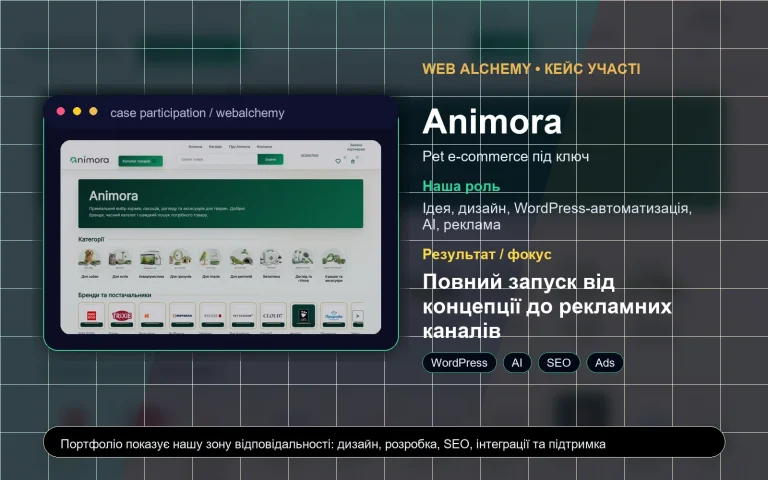
Animora – turnkey pet e-commerce with automation
Online store design and structure as part of a turnkey launch.
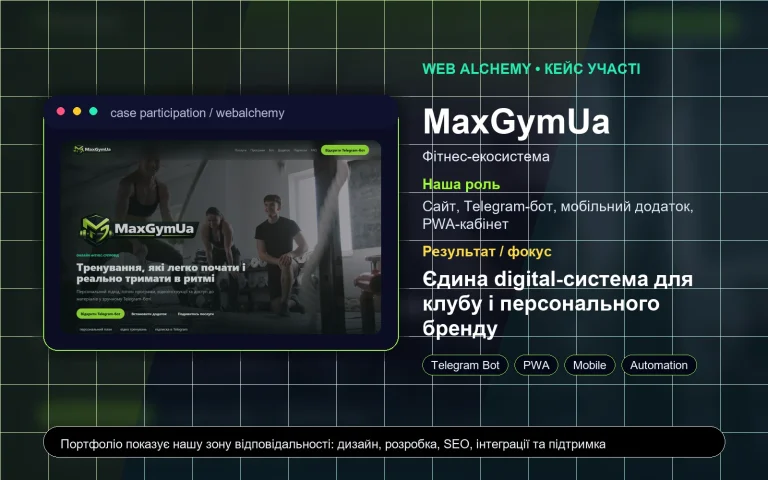
MaxGymUa – a digital ecosystem for a fitness project
Interfaces for a sports project: website, app, and PWA portal.
Useful before you start
Questions before starting
Can I order design only, without development?
Yes. We can prepare a prototype, UI/UX design, and design system separately, and hand the mockups over to your development team.
What is needed to start the design?
We need website goals, a description of services or products, competitor examples, the desired style, page structure, and key user actions.
Is SEO considered during design?
Yes. We design sections for future target keywords: H1-H3, FAQs, case studies, benefits, internal links, and clear CTAs.
Next step
Need to understand which format is right for you?
View all services, open portfolio, compare prices or ask AI consultant.