
WooCommerce plugin Web Alchemy
WA Bulk Attributes & Prices
Bulk updates to prices and global attributes after previewing. Filters, small batches, pause, and restoration of the last operation.

Before purchasing
Version 1.1.0 limitations
The plugin works with the standard WooCommerce product storage and global pa_* attributes. It does not create variations, look up individual variation SKUs, import catalogs, or change currency/taxes. Deleted products, records without access permissions, and conflicts with manual edits require operator review. Standard WooCommerce save hooks remain active, so test compatibility with your integrations on a copy of the site.
What's Inside
Bulk changes with a preview plan
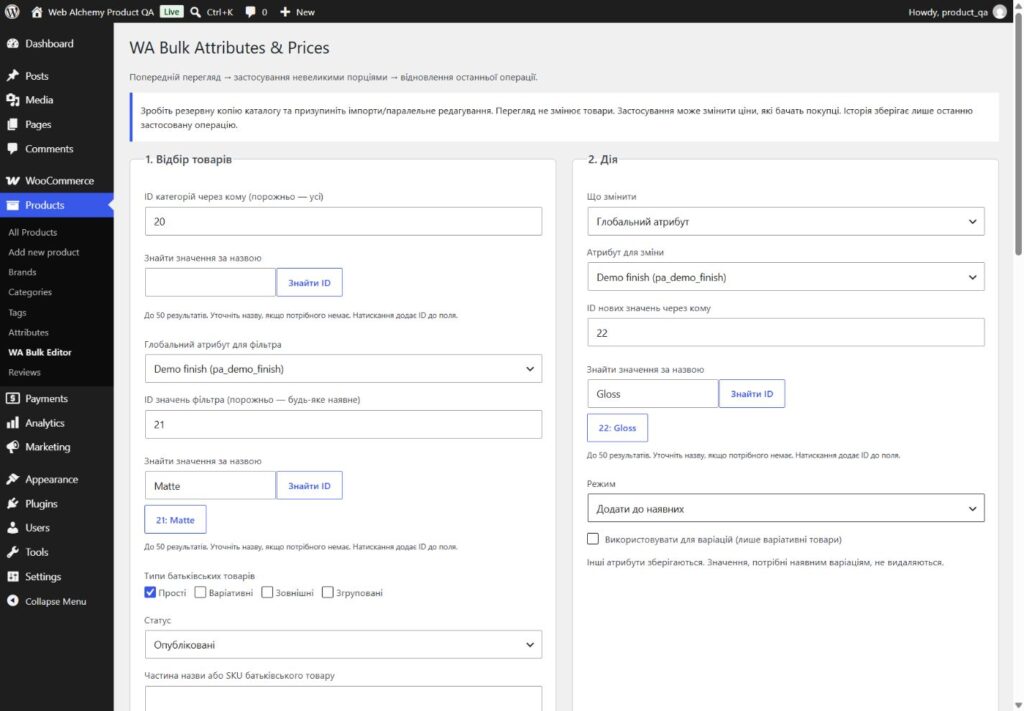
WA Bulk Attributes & Prices helps change prices or global attributes for selected WooCommerce products. The plugin first displays the original and planned values, then applies them in small batches. You can stop the cycle and resume it after reloading the page.
Select exactly the products you need
Combine categories and their subcategories, a global attribute and its values, product types, and status. Search matches part of the parent product’s name or SKU. Category/value IDs can be found by name directly in the form. Products added after the preview begins are not included in the current plan.
Prices and variations
- Increase or decrease by a percentage or fixed amount.
- Work separately with regular prices, sale prices or both.
- Rounding to currency precision or a whole number.
- Preserving sale start and end dates.
- Optional processing of published variations and synchronization of the parent's price range.
Blank prices are not created, and results cannot be negative. A sale price equal to or higher than the regular price is cleared according to WooCommerce rules. This is shown in the plan before it is applied.
Global attributes
Add values to existing ones or replace values for the selected attribute only. Other global and local attributes are preserved. For a variable parent product, you can enable use of the attribute in variations. The plugin checks dependent variations and does not remove values they need.
Pause, resume, restore
The catalog is processed in batches of 40 records using an ID cursor. History is saved before the product is written, so retrying a request after an interruption should not apply the percentage twice. The log shows the last 40 results.
Restoring the last applied operation is also available without an active license. Manual changes to target fields are skipped and flagged for review. A single operation's history is not a full catalog backup. Before processing, make a backup and pause third-party imports/editing.
Package Contents and Installation
The buyer receives an installable ZIP, a personal key in a private outer archive, a user guide, activation documentation and a technical description. WooCommerce is installed separately.
1. Install the inner ZIP in WordPress and activate the plugin.
2. Enter your individual key in Settings → License.
3. Open Products → WA Bulk Editor and create a plan.
4. Review the result, apply the changes and check the storefront.
One purchase means one active installation, transferable after deactivation. Source code is distributed under GPL-2.0-or-later.
Version 1.1.0 limitations
The plugin works with the standard WooCommerce product storage and global pa_* attributes. It does not create variations, look up individual variation SKUs, import catalogs, or change currency/taxes. Deleted products, records without access permissions, and conflicts with manual edits require operator review. Standard WooCommerce save hooks remain active, so test compatibility with your integrations on a copy of the site.
Automatic updates, full multiversion history and remote synchronization are not included in this version. After making changes, clear the page cache and check prices and attributes on the storefront.
Interface
Product features
- A preview plan with original and new values
- Categories, attributes, types, status, name or SKU
- Percentage or fixed adjustments to regular and sale prices
- Rounding and preservation of sale dates
- Support for published variations and parent synchronization
- Adding or replacing global attribute values
- Pause and resume with an ID cursor
- Restore the latest operation with conflict checking
Technologies
License
One-time purchase. One active installation. Transfer after deactivation. GPL-2.0-or-later for the source code.
Support
Buyer's guide, activation/transfer instructions, and technical description. The history of one operation does not replace a backup. Automatic updates are not included in version 1.1.0.
CTA
Need a version tailored to your business?
Contact us if a ready-made product needs to be adapted to your CMS, CRM, payments, account area or automation workflow.