
Windows Application Web Alchemy
WA Daily Planner — Tasks
Early release. A Ukrainian-language planner for Windows: tasks, projects, priorities, subtasks, and flexible reminders. Data is stored on your computer, and the license can be transferred between installations.

Before purchasing
Requirements and limitations
The application is intended for personal, local planning. It has no synchronization, team access, mobile version, attachments, automatic updates, or its own Authenticode signature. Limits are 20 000 tasks, 100 subtasks per record, and a 30 MB database; large databases are not a target use case. Windows 10, ARM, Server, Wine, and network profiles were not individually acceptance-tested.
What's Inside
WA Daily Planner — Tasks — a Ukrainian planner on your computer
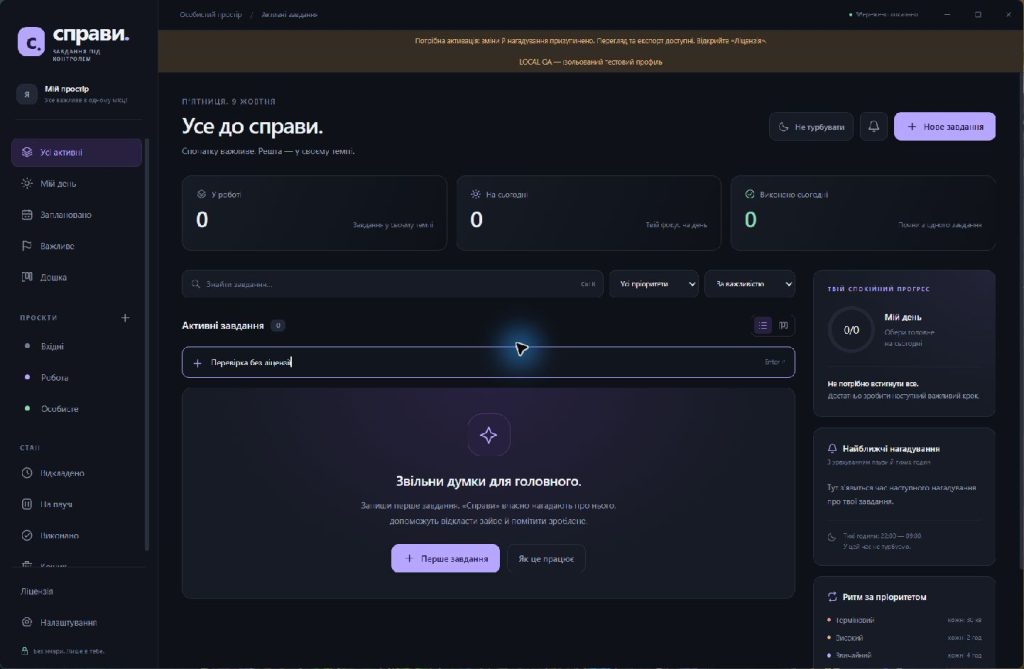
Keep work and personal tasks in one place: from a quick entry to a project with subtasks, notes, and deadlines. View a list or a status board, gather today’s tasks, and find what you need with search.
Early release 1.0.1. Full testing of application windows, the system tray, and Windows reminders is not yet complete. Task and storage logic, licensing, and personalized archive delivery have been tested. Before relying on it for important tasks, test the workflows you need on your own PC.
Planning without unnecessary steps
- Quick entry with Enter or the full editor with Ctrl+N.
- Projects, four priorities, notes, and subtasks.
- “My Day”, “Planned”, “Important”, search, filters, and sorting.
- Statuses: “In progress,” “Deferred,” “On hold,” and “Completed,” plus a trash folder with restoration.
Reminders tailored to your schedule
Choose a deadline alert, recurring reminders based on priority, or a custom interval. Quiet hours and a global pause help control notification timing. From the reminder window, you can complete, snooze, or pause a task.
Reminders require the application to be running and an active license. A computer that is off, locked, or asleep does not issue alerts. Repetition reminds you about the same task rather than creating new copies.
Your tasks are stored locally
The application stores JSON in its own profile and creates a previous-version backup and daily backups. Export and restore are available; restoring replaces the current database while retaining a copy of it. Tasks are not sent to the licensing server. The records themselves are not encrypted, so external backups and profile protection remain important.
What the Purchase Includes
A ready-to-use package for Windows 11 x64 with Electron included, Ukrainian instructions, JavaScript source code, and an individual key from the Web Alchemy order. Approximate ZIP size: 158 MB; at least 1 GB of free space is required for extraction and operation. Administrator privileges are not required.
License and transfer
One purchase means one active installation on one PC under one Windows profile. Before transferring it, deactivate the key and then activate it in the new location. Verification requires internet access: confirmation is cached for up to 12 hours. Without renewed confirmation, editing and reminders are suspended; viewing and export remain available.
Requirements and limitations
The application is intended for personal, local planning. It has no synchronization, team access, mobile version, attachments, automatic updates, or its own Authenticode signature. Limits are 20 000 tasks, 100 subtasks per record, and a 30 MB database; large databases are not a target use case. Windows 10, ARM, Server, Wine, and network profiles were not individually acceptance-tested.
The underlying Delo code retains its MIT license rights. The commercial purchase covers the prepared package, localization, licensing service and personalized delivery by Web Alchemy.
Interface
New in version 1.0.1: remind tomorrow
The pop-up reminder now includes a button “For tomorrow” alongside +15 min and +1 hr. The reminder moves to the next calendar day at the same local time as when clicked. The task deadline, notes, and subtasks are preserved. Quiet hours and the global pause are respected.
The update does not change the data format, profile folder, or license. Update instructions and a changelog are included in the archive.
Product features
- Quick add and a full task editor
- Projects, subtasks, notes, search, and sorting
- My Day, planned tasks, and important tasks
- A List and Status Board
- Reminders by time, priority, and custom interval
- Snooze, pause, quiet hours, and “Do not disturb” mode
- The “Tomorrow” button in a pop-up reminder — the same local time on the following day
- Pop-up reminders, system tray and optional startup launch
- Local JSON, export, restoration, and backups
- Ukrainian interface and documentation
- One active installation with transfer
Technologies
License
One-time purchase of version 1.0.1. One active installation on one PC in one Windows profile; transfer after deactivation. Rights to the underlying source under MIT are preserved.
Support
Instructions for installation, use, backup, updates, license transfer and removal. JavaScript source code and third-party license notices are included.
CTA
Need a version tailored to your business?
Contact us if a ready-made product needs to be adapted to your CMS, CRM, payments, account area or automation workflow.