
Windows utility Web Alchemy
WA RDP Multimon Fixer
A Windows utility for automatically disabling multi-monitor mode in RDP files: a selected folder, manual scanning, background monitoring, and protected backups with restore.
Before purchasing
Requirements and transparent limitations
Windows 11 x64, .NET Framework 4.8+, a local folder, and internet access for licensing. Tested on Windows 11 Pro x64 build 26300. Windows 10, ARM, and Windows Server have not been tested separately. The distribution has no Authenticode signature; whether it can run depends on your PC's policies.
What's Inside
RDP on one monitor — without repeated manual edits
WA RDP Multimon Fixer is a compact Windows application that disables multi-monitor mode in local .rdp connection files. It is useful when a work service regularly issues new files and you need to open each connection on a single monitor.
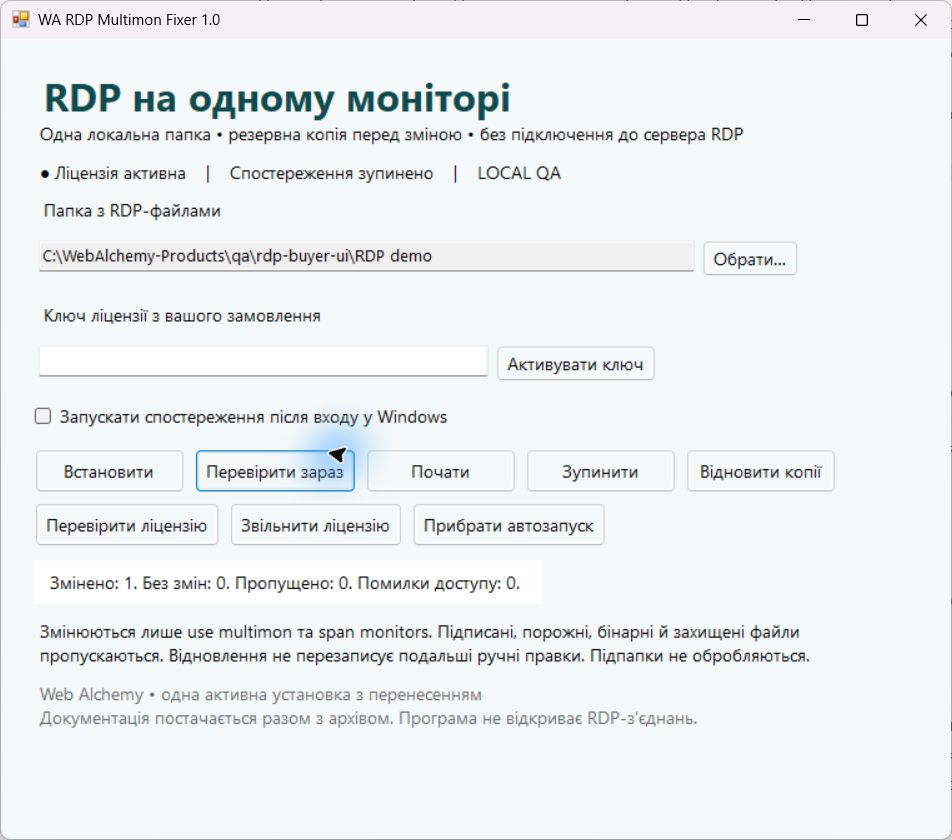
Select a dedicated folder, activate the key and run a manual check or start background monitoring. Before making a change, the program creates a protected backup. Simply opening the program does not enable startup launch or modify files.
What the product can do
- Two parameters for one monitor. In supported files, it sets use multimon:i:0 and span monitors:i:0, adds missing lines, and handles duplicates. It preserves the server address, gateway, username, and other settings.
- Your selected folder. Manual scanning and background monitoring of file creation, changes, and renaming. Subfolders are untouched; Downloads is not selected automatically.
- Backup before changes. The original bytes are stored locally with Windows DPAPI encryption. For each path, the latest version before processing is retained.
- Controlled restoration. The button restores a file from its backup if it has not been manually changed since processing. Restore and stop are also available without a valid license.
- Preserving the format. UTF-8/ANSI without BOM, UTF-8 with BOM, UTF-16 LE/BE with BOM; CRLF, LF, and CR line endings. Unrelated lines are preserved byte for byte.
- Clear controls. A Ukrainian-language interface, counts of changes, skipped files, and errors, current background process status, manual license verification, and separate start and stop buttons.
- Per-user installation. No administrator privileges required, with optional startup after signing in to Windows. Closing the window does not stop an already running background process.
- CLI and source code. For inspection, administration and adaptation within the licensed installation, without third-party NuGet dependencies.
Who it is for
For employees and administrators who regularly receive ordinary unsigned RDP files and want to automate a repetitive action. For a one-off file, manual editing is enough; buying the program just for this is not necessary.
Package contents and first launch
- After paying for the order, receive your personal archive and unique key.
- Extract the Windows distribution from the install folder and open the EXE.
- Choose a local folder, activate the key, and test a copy of one RDP file.
- If needed, install the application for your profile and enable monitoring.
The package includes the EXE, source code, license, and Ukrainian guides for installation, use, backups, updates, rollback, license transfer, and removal. This is a Windows application: you do not need to upload it to WordPress.
Requirements and transparent limitations
Windows 11 x64, .NET Framework 4.8+, a local folder, and internet access for licensing. Tested on Windows 11 Pro x64 build 26300. Windows 10, ARM, and Windows Server have not been tested separately. The distribution has no Authenticode signature; whether it can run depends on your PC's policies.
The top level of one folder is processed: up to 1000 RDP files per scan and up to 512 KiB per file. Signed files with signature/signscope, network folders, links, UTF-32, binary, empty, and protected files are skipped. Signed provider files are configured through the provider's administrator.
The application edits files and does not open RDP sessions. It does not provide a remote server, VPN, account access, or selection of a specific monitor number. Server policies, the client, and its arguments may affect the final behavior. Real third-party RDP sessions were not included in acceptance testing. When a new file appears, wait for it to be processed before connecting.
DPAPI backups require the same Windows profile; restore the files you need before reinstalling the system. Automatic restore skips subsequent manual edits and renamed files. Keep independent backups of important data. Automatic updates and unlimited file version history are not included in 1.0.0.
One purchase — one active installation
490 UAH, one-time purchase. The license covers one Windows profile on one PC and can be transferred after deactivation. The key is created for your order. Verification is cached for up to 12 hours; if a new check fails, processing is paused while restoration remains available.
RDP contents and passwords are not sent to Web Alchemy. License checks transmit the key, product code, version, installation identifier and device hash. The application's own code is distributed under the commercial license included in the package. Windows and .NET are purchased and licensed separately if your environment requires it.
Interface
Product features
- use multimon and span monitors — always 0 in supported files
- One explicitly selected local folder, without processing subfolders
- Manual checks and background monitoring for new files
- A Windows DPAPI-protected backup before changes
- Restoration without overwriting subsequent manual edits
- Preservation of encoding, line endings, and other parameters
- Skipping signed, binary, and protected files
- Ukrainian-language interface, keyboard controls, and CLI
- Installation without administrator privileges, optional built-in startup launch
- One active installation with transfer
Technologies
License
One-time purchase. One active installation under one Windows profile on one PC; transferable after deactivation. Proprietary code is covered by the commercial license included in the archive.
Support
Ukrainian instructions for installation, use, updates, recovery, license transfer, and removal; source code for review and adaptation within the purchased installation. Remote server configuration is not included in the product.
CTA
Need a version tailored to your business?
Contact us if a ready-made product needs to be adapted to your CMS, CRM, payments, account area or automation workflow.